.png?width=225&height=106&name=mockup%20(32).png)
Understanding Ledger Colors and Payment Status
Use color indicators, balances, and ledger markers to quickly track payment activity, identify outstanding amounts, and confirm when transactions have been successfully processed.
Payments and charges in the ledger are color-coded to show their status.- Items such as down payments, principal payments, processing fees, returned items, and late fees appear in blue.
- Charges that have not been paid or processed will show a remaining balance in orange in the Balance column.
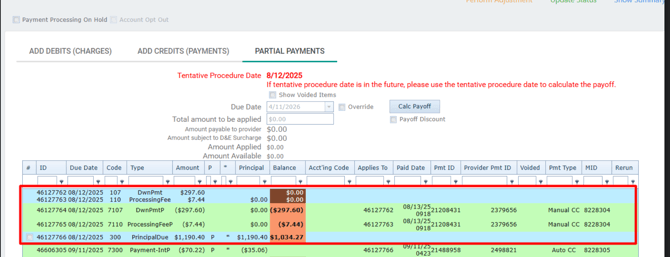
❗If the amount in the Balance column appears in parentheses ( ), it indicates that the charge has been paid. These items typically do not count toward the overall Amount Financed *Principal Due*.
- The PrincipalDue in the Balance column will decrease over time as regularly scheduled payments are made. This column will only include the amount due less any interest.
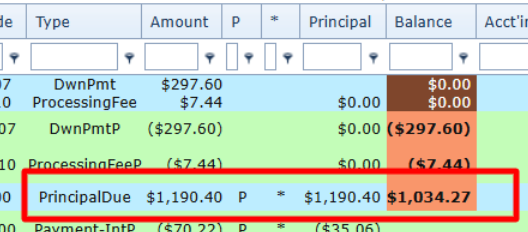
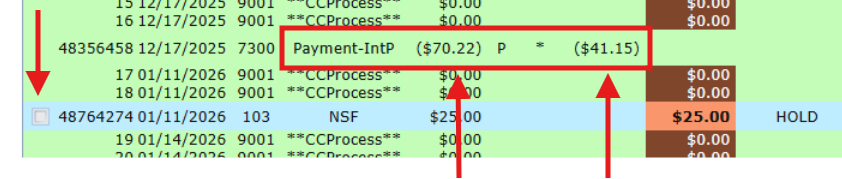
- Totals shown in the Principal and Amount columns confirm that a payment has been successfully processed. The Amount column reflects the full payment amount, while the Principal column shows how much of that payment was applied to the PrincipalDue..
- Payments that are available to be posted will have a checkbox next to them in the ledger.
Column Definitions
| ID | The payment ID number for the line item |
| Due Date | The date the payment is due |
| Code | The payment processing code indicates the type of payment that was processed |
| Type | Much like the processing code this spells out the type of payment that was processed |
| Amount | The total amount of the payment due or processed |
| P | If visible in the column, this indicates that a payment was processed for the total in the amount column |
| Principal Balance | Total principal balance remaining for the consumer, less interest and excluding any fees incurred over the life of the payment plan. |
| Acct'ing Code |
Indicates the type of payment or processing type.
|
| Applies to | Indicates the payment ID in which the payment was applied to. |
| Paid Date | The date the payment was processed |
| Pmnt ID | The ID for the total payment that was made. A single payment can apply to multiple line items (payment ID's) |
| Voided | Indicates if the payment in that line item was voided |
| MID | Indicates which payment processor was used to complete the transaction on the HFD side. |
| Rerun | Indicates whether the payment was processed through the rerun processing workflow. |
FeeCodes and Types
| Code | Type | Definition |
| 107 | DwnPmt | Down payment that is due |
| 110 | ProcessingFee | Card processing fee charged to process the payment |
| 7107 | DwnPmtP | Down payment paid |
| 7110 | ProcessingFeeP | Processing fee paid |
| 300 | PrincipalDue | The total amount of contracted payments due, less any interest |
| 7300 | Payment-IntP | Total amount payment process |
| 9001 | **CCProcess** | An attempt to process a payment was made |
| 103 | NSF | An NSF fee line item added due to an unsuccessful payment |
| 7103 | NSF | An NSF fee PAID |
| 104 | LateFee | An LATE fee line item added due to a payment that has not been made past a specific threshold |